Cravel · 2026 · Design system
Where search, filters, and View go in every Cravel table
Two rounds of AI agents on the toolbar every table shares
cravel.com.arThe result
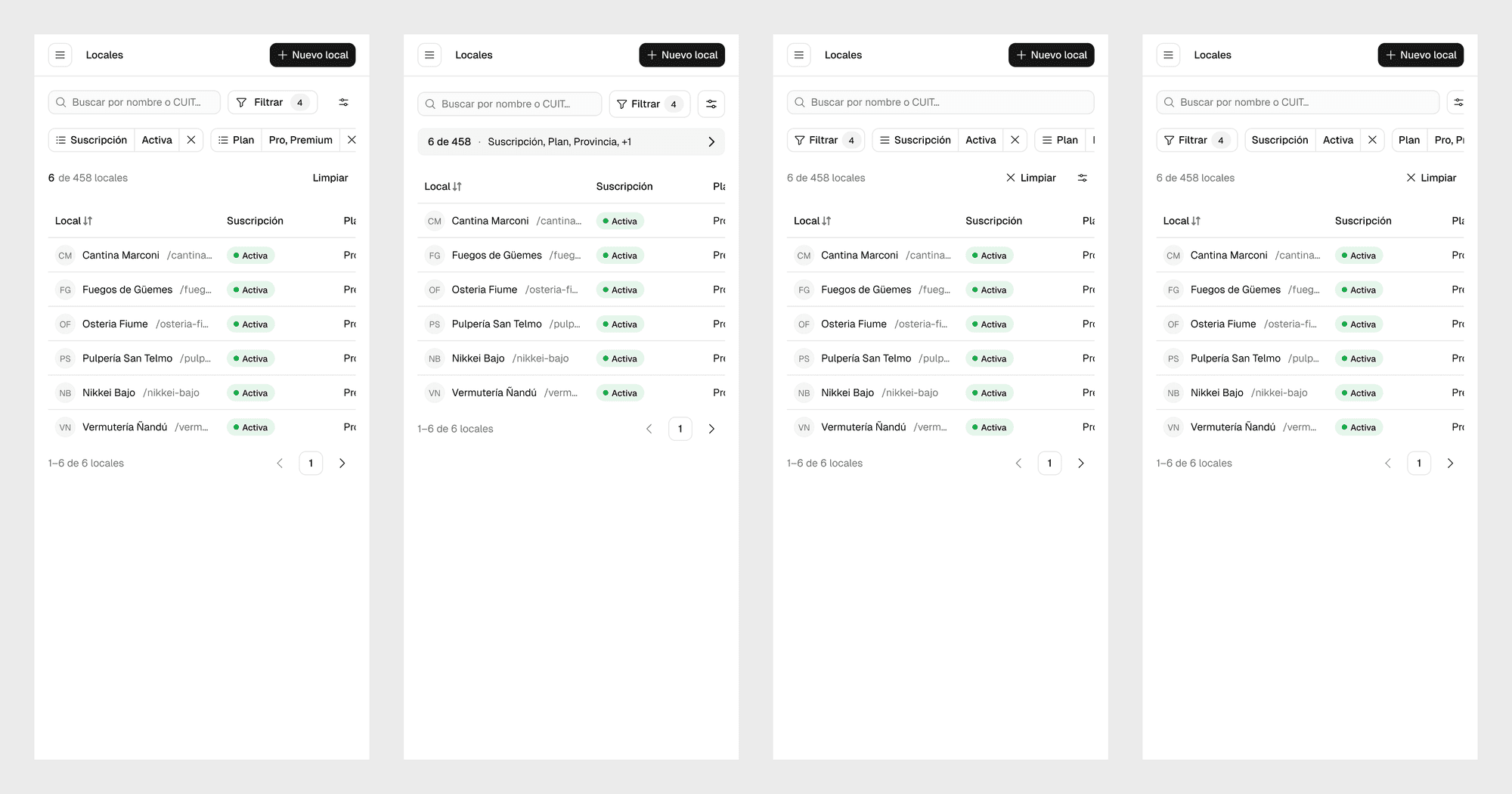
The table toolbar in Cravel’s design system fell apart under many filters. On a phone, four rules took 244 px before the first row of data. I ran two rounds of exploration with AI agents, eight directions in total, on the real Venues table. The synthesis takes 116 px on a phone with any number of rules. On desktop it measures the same as the patch I started from, 64 px with four rules, but the controls no longer move when a rule is added. The synthesis was promoted to the design system.
The product UI is in Spanish. In the text, Filtrar is Filter, Limpiar is Clear, and Vista is View.
The problem was in the system
Cravel is a platform for restaurants and food venues. I co-founded Cravel and share its design work with one of my co-founders. I’m redesigning the support team’s internal tool in Figma, and for Venues I asked for a full table, 458 venues, with the focus on search and filters. Every table in the design system has a toolbar with four things: search, filter rules as chips, the Filter and Clear buttons, and View, which shows or hides columns.
I asked to see the hard case: many filters, wrapping to two rows. Claude, acting as the orchestrator in this work, set up four real rules that leave 6 venues and solved it with a patch.
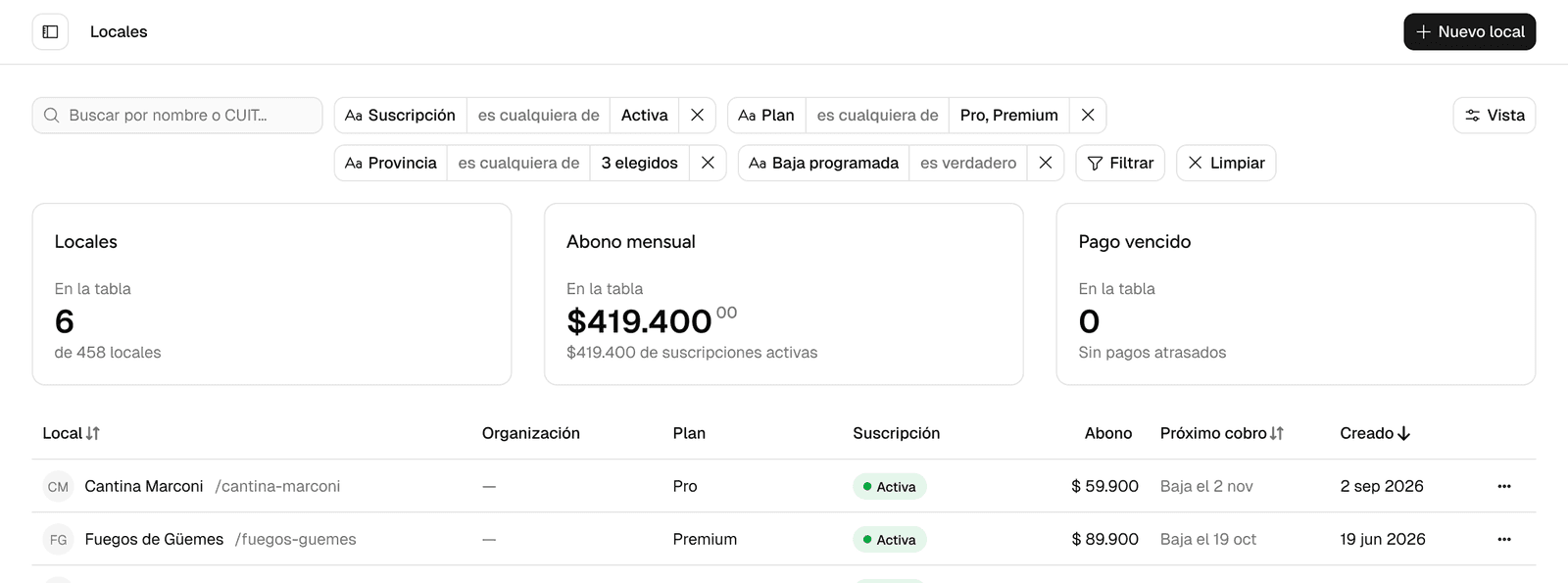
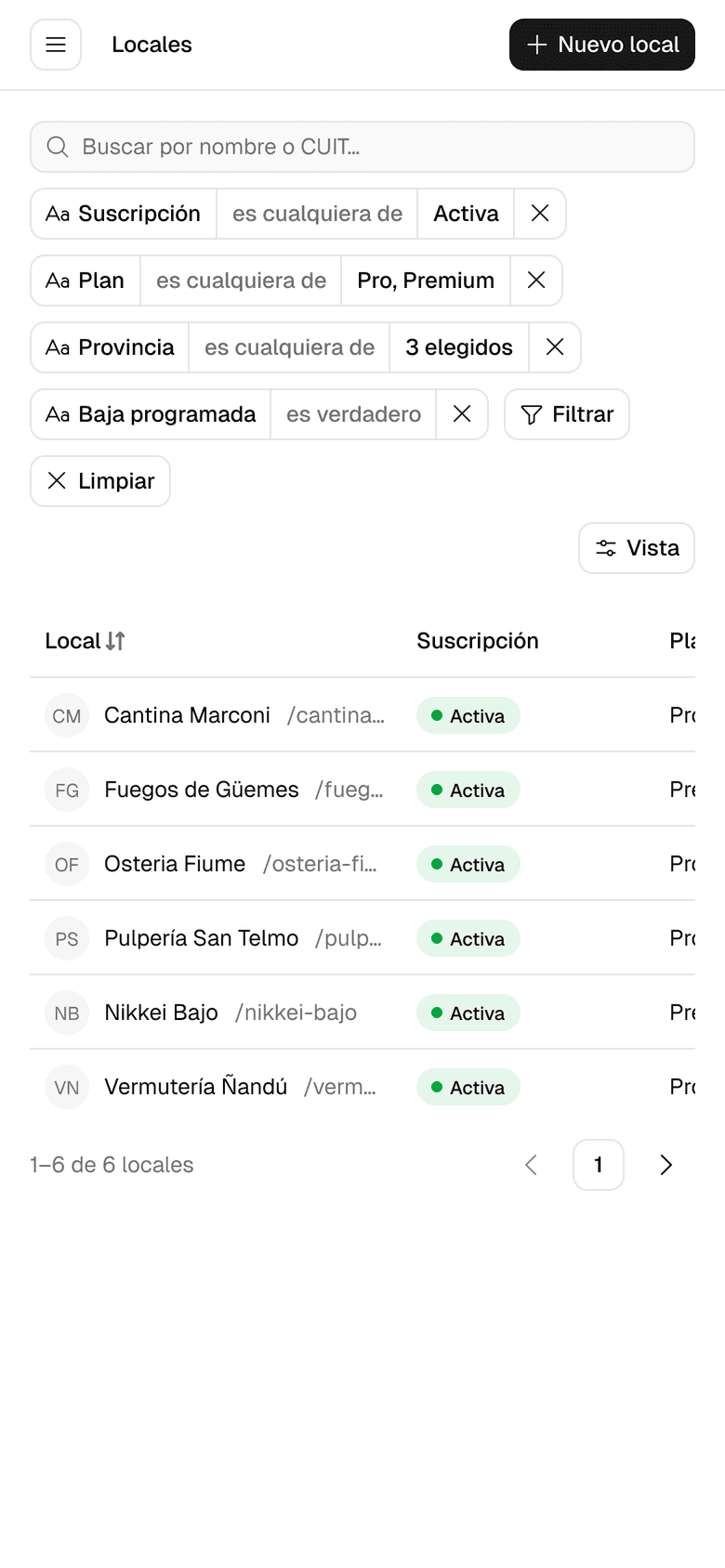
Reviewing its own patch, the orchestrator found the defect wasn’t in that screen. In the kit, Data Table / Toolbar is a single row with no wrap, and Filter / Bar holds four chips at most. With four, the bar grows and pushes View out. In the code, both wrap freely, so with many chips search ends up alone on top and View alone on a third row.
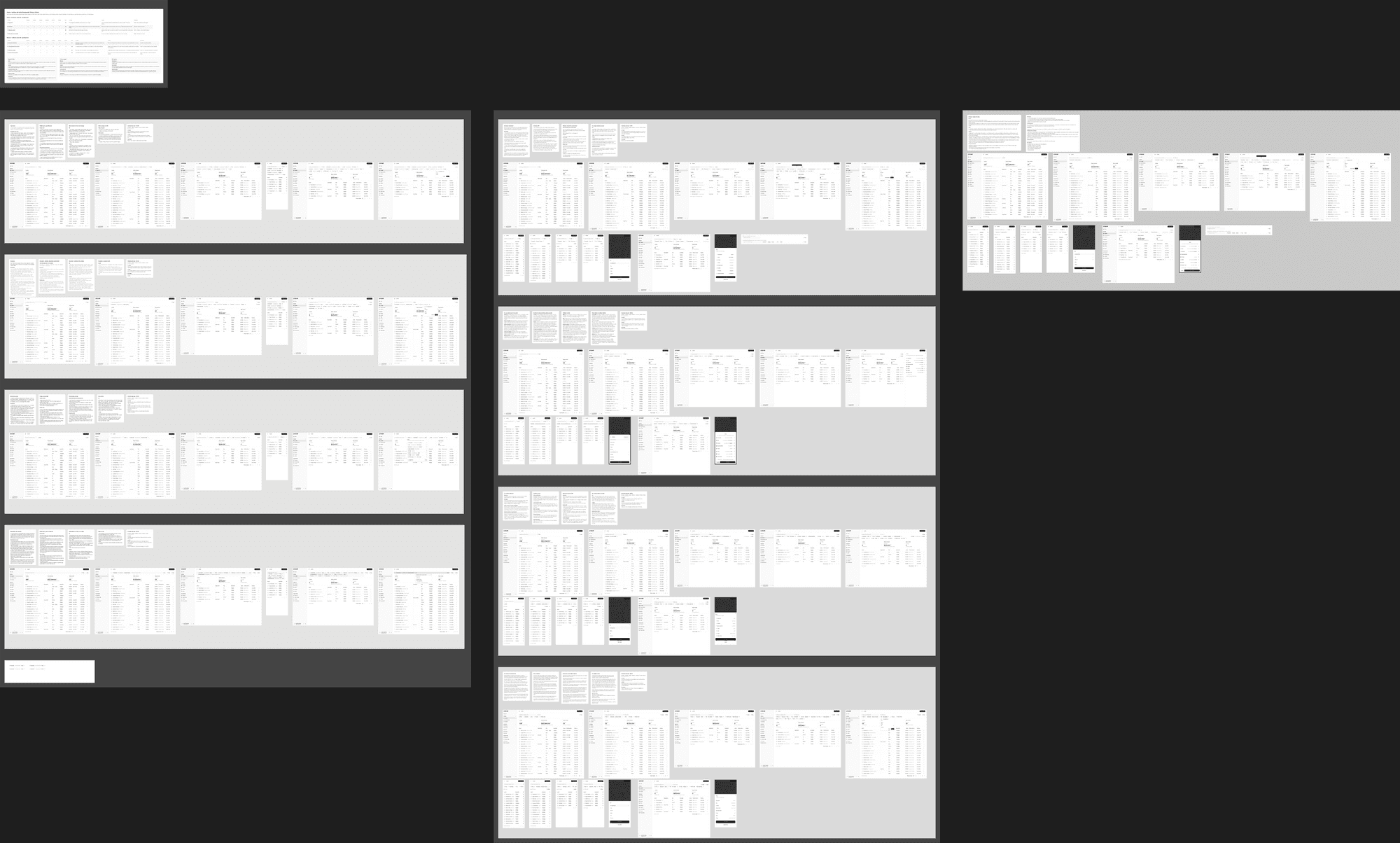
It didn’t sit right with me either. A patch would fix Venues, but the toolbar is in every table of the design system, and whatever we chose here would repeat in all of them. So instead of polishing the patch, I asked for an exploration of how search, filters, and View should share the space, run with arena-design.
A rubric before anything was drawn
The hypothesis was that the toolbar’s structure was failing, not the patch. The orchestrator turned that into six criteria and showed them to me before launching anything.
- Stable controls. Search, Filter, and View stay in the same place from 0 to 8 rules.
- Rules readable and one click away.
- Reach to the table, measured as the toolbar’s height with four rules.
- Hierarchy and rhythm. Search is the main input, View is tertiary, and no control sits alone on a row.
- System. Built from kit parts, with the change to the kit and the code stated.
- Scale. Works on a search-only table, with faceted filters, and with 8 rules.
The first three are the hypothesis. The fifth and sixth exist because the change touches every table: a solution that needs a new component can win on one screen and lose in the system.
The method
arena-design is a skill of mine for exploring a design problem with several agents in parallel. It suits this problem because the solution space is small and known, four or five patterns already in production, and the difference between them shows up at the edges: the eighth rule, 390 px, the table with no filters. Without the agents, I would have drawn one direction and defended it.
- Divergence is forced. Each candidate gets a different, named direction and doesn’t see the others.
- The judge scores what renders. It looks at screenshots, not the candidate’s notes, because notes always sound convincing.
- One whole base, with grafts. Never average. The midpoint between two good layouts is usually a bad one.
- One section per candidate. In Figma, each works in its own section, and the synthesis in a separate one.
Round 1: the judge overruled the orchestrator
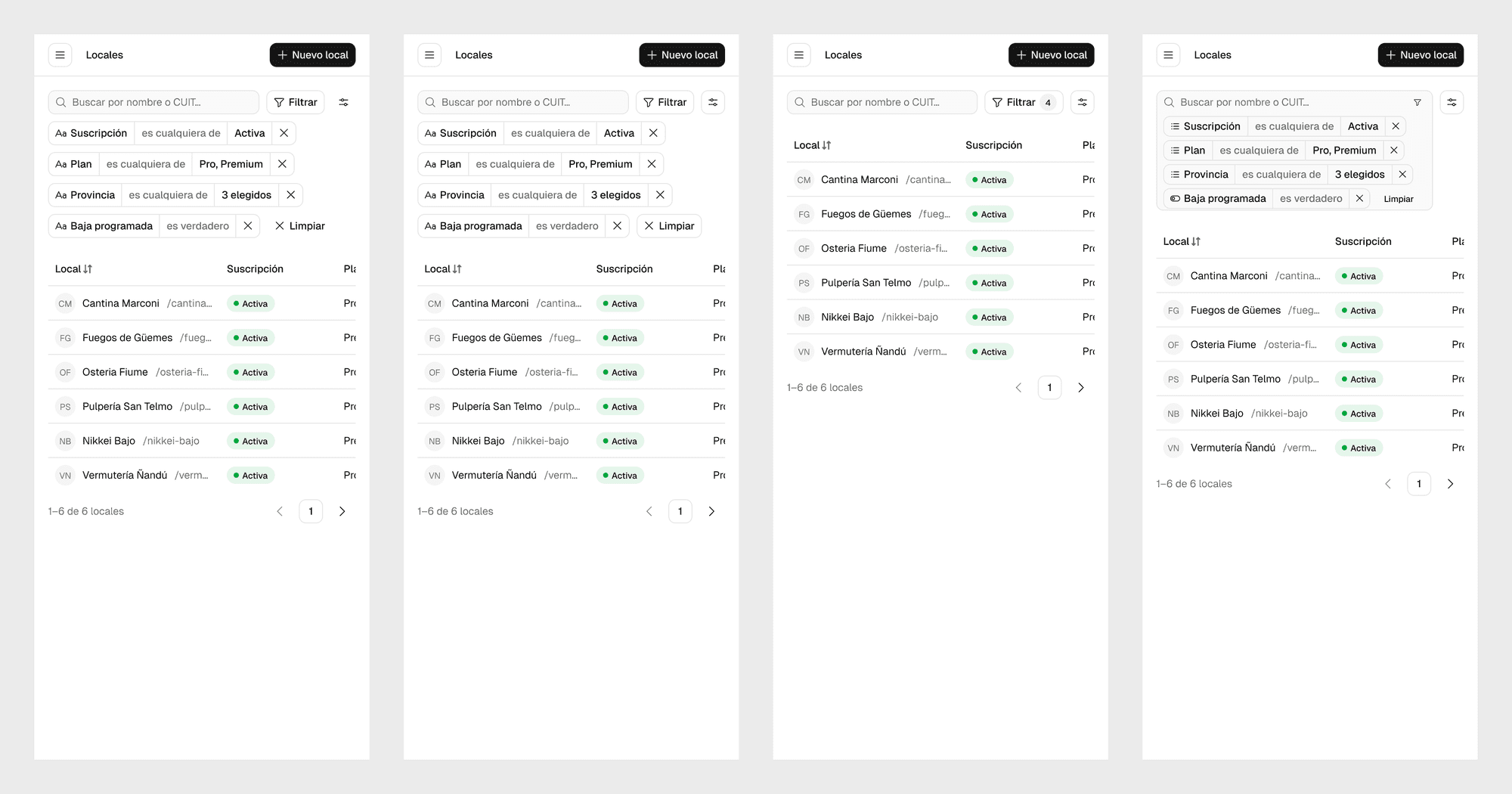
Research came from Mobbin and returned four named patterns. Each became a direction, handled by an Opus 5.5 agent on the same four Venues screens.
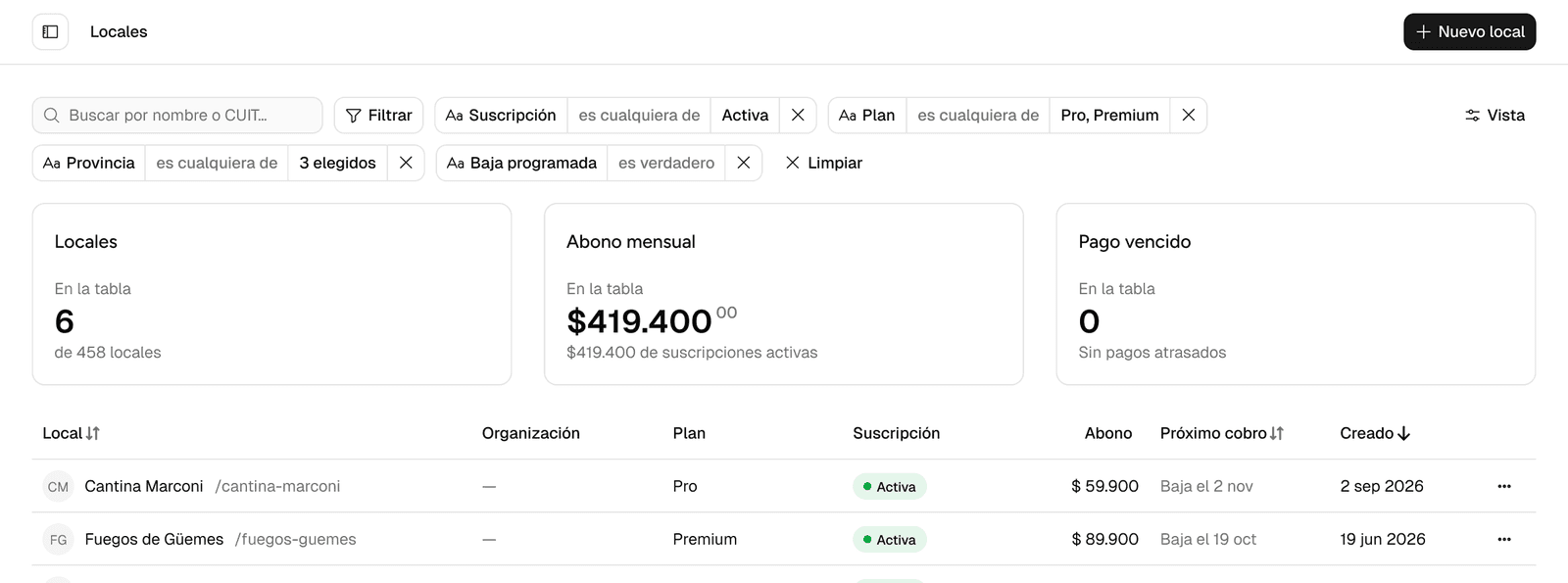
- A · Single flow. Filter and the chips follow search on the same line and wrap. The first line of chips starts after Filter and the second at the left edge, so the rules read from two edges.
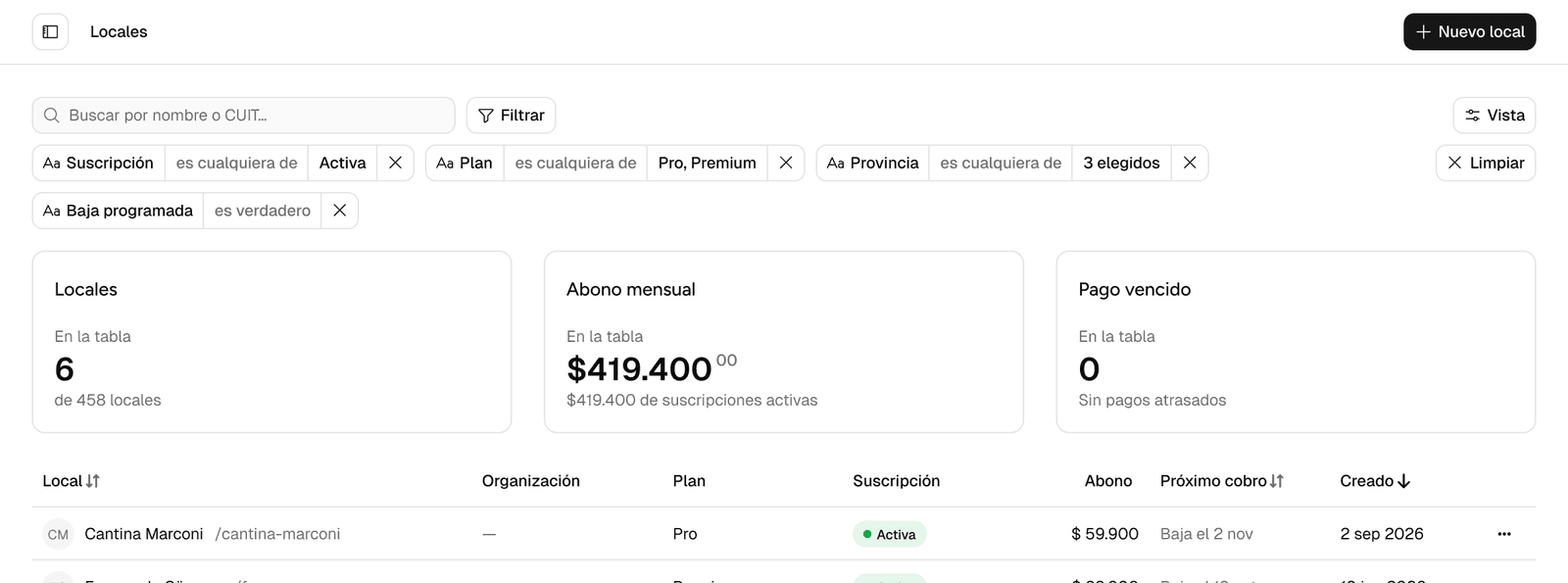
- B · Two tiers. A fixed row of controls on top, and the chips below, shown only when there are rules. Every chip starts at the search’s edge and Clear stays fixed under View. With four rules the fourth chip drops alone to another row, and the toolbar reaches 100 px.
- C · Summary and panel. One line with two chips and a “+2”. The shortest, 28 px, and with four rules only two are readable.
- D · Search as query. Rules are tokens inside the search box. Where you type moves with each rule.
A separate agent, the judge, scored the screenshots against the rubric.
| CriterionCriterion | AA · Single flow | BB · Two tiers | CC · Summary and panel | DD · Search as query |
|---|---|---|---|---|
| 1. Stable controls | 4 | 5 | 5 | 2 |
| 2. Rules readable, one click | 4 | 5 | 2 | 4 |
| 3. Reach to the table | 4 | 3 | 4 | 5 |
| 4. Hierarchy and rhythm | 3 | 4 | 4 | 3 |
| 5. System | 4 | 5 | 3 | 2 |
| 6. Scale in the design system | 4 | 4 | 4 | 3 |
| Total (out of 30) | 23 | 26 | 22 | 19 |
Before the verdict, the orchestrator leaned toward A, which measures 64 px with four rules against B’s 100. The judge chose B on criteria 1, 2, and 5, and the orchestrator accepted the argument. In A, Clear shifts with every rule added and the chips start at two different edges. In B nothing moves and every rule reads from the same edge. The judge itself noted that a more compact chip could bring B from 100 down to 64.
The judge also listed what nobody solved, most of it on the phone. A and B had come out the same there, one chip per row and 172 px.
Between rounds I changed the brief
Round 1 had given the phone a single screen per candidate, and that’s where most of the open problems were. So I asked for a second round with broader research, beyond Mobbin, and with phone variants explored on their own.
The research agent worked from web search and public design-system documentation: Helios, Innovaccer, Stripe, PatternFly, and Linear. Its memo flagged the phone part as thin, and the orchestrator filled it in from Mobbin: the scrolling chip row in Wise, the chip without an operator in GitHub iOS, the filter button with a count in Public, the sheet in Mercury, and the “N hidden by filters” in Linear.
Round 2: three candidates, the same phone
The brief changed in four ways. The phone weighs as much as desktop. The chip’s anatomy may change if the change is stated. The result (“6 of 458 venues”) sits next to the rules. 1280 has to be tested. The rubric added a seventh criterion, complete phone.
- A · Compact two tiers. Round 1’s winner with a chip that hides the operator “is any of”. All four rules fit on one row. Clear is still on top, next to Filter, and “Scheduled cancellation” still says “is true”.
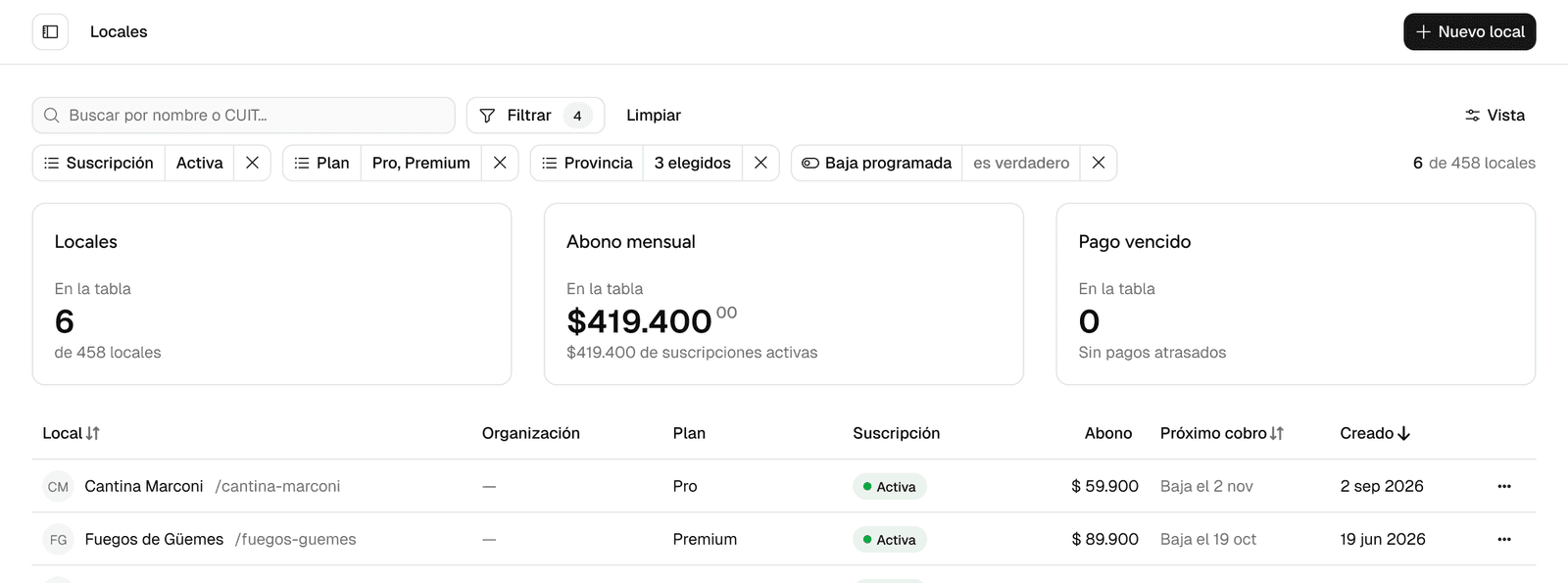
- B · Rules live in a panel. Four chips, and the rest summarized as a “+4” line of text that opens a panel.
- C · Always one line. A chip row cut off by a fade and a “See all 8”.
- D · Fixed frequent fields. The most-filtered fields always live as dashed chips. The toolbar takes 64 px with no rule applied.
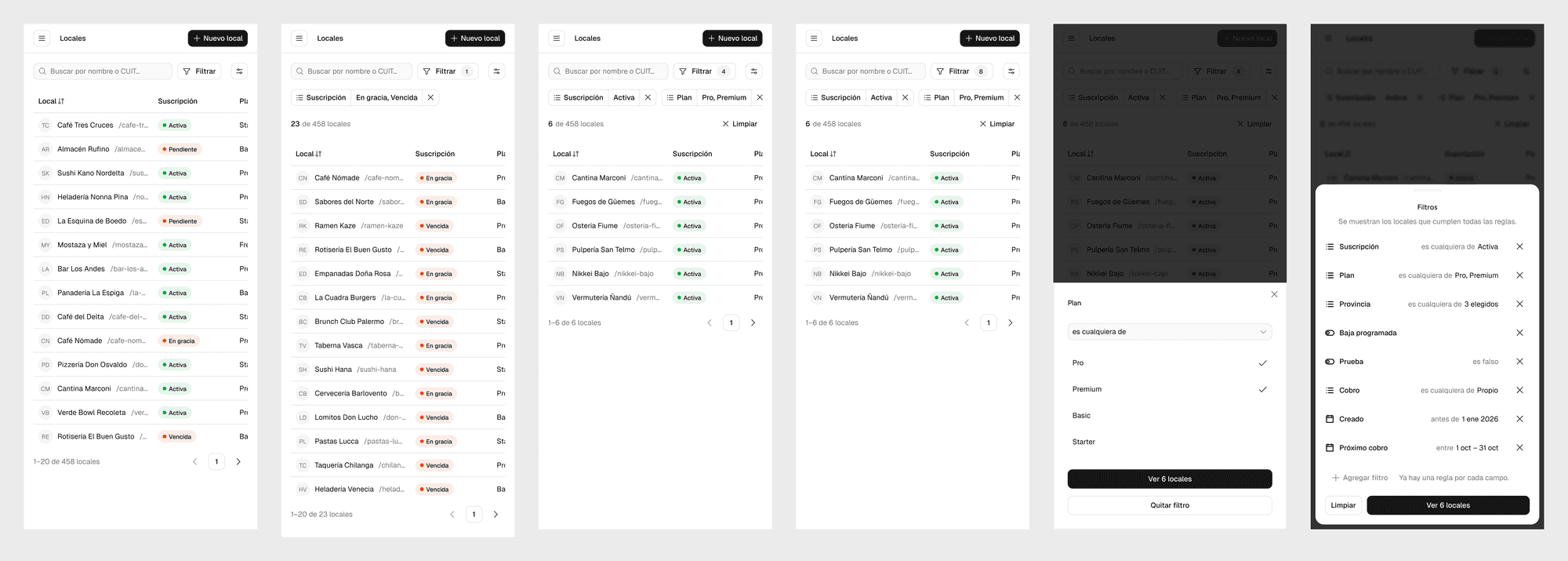
On the phone, A, C, and D reached the same solution without seeing each other: controls on top, a horizontally scrolling chip row, and a band with the result and Clear. 116 px, all three. B broke away with a one-line summary that names the fields and opens a sheet, in 76 px.
| CriterionCriterion | AA · Compact two tiers | BB · Rules in a panel | CC · Always one line | DD · Fixed frequent fields |
|---|---|---|---|---|
| 1. Stable controls | 5 | 5 | 5 | 4 |
| 2. Rules readable, one click | 4 | 3 | 3 | 4 |
| 3. Reach to the table | 4 | 5 | 4 | 4 |
| 4. Complete phone | 4 | 5 | 3 | 3 |
| 5. Hierarchy and rhythm | 4 | 4 | 3 | 3 |
| 6. System | 5 | 3 | 4 | 4 |
| 7. Scale in the design system | 5 | 3 | 3 | 4 |
| Total (out of 35) | 31 | 28 | 25 | 26 |
A won on criteria 2, 6, and 7. It’s the only one that shows all 8 rules in full on desktop, each with an X, needs no new components, and drew the scale cases: a search-only table and a table with faceted filters. This time the orchestrator agreed with the judge.
The synthesis: one base, four grafts
The base is A. The judge scored B higher on the phone, but a different base for 390 px wasn’t needed. A already had a filter sheet, so changing its contents was enough. The grafts, with their source:
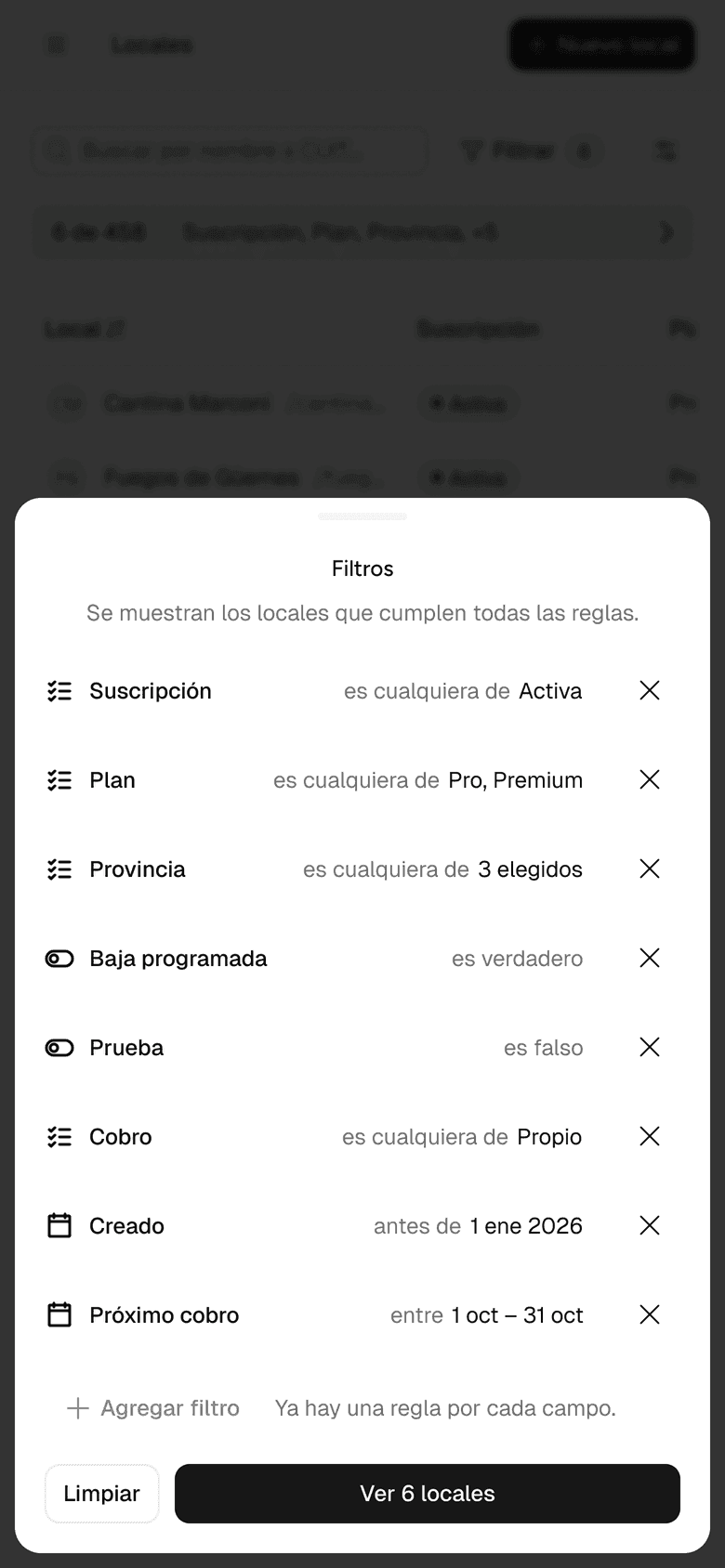
- From B, the phone sheet. One rule per row with its X, “Add filter” at the end, and Clear and “See 6 venues” in the footer.
- From C, Clear fixed under View, shown from the second rule on. With a single rule, the chip’s X is enough.
- From D, “Remove filter” in the editor, so there aren’t two “Clear” buttons with different scopes.
- From D, Filter stays enabled on the phone when all eight fields already have a rule. It opens the sheet, which explains: “There’s already a rule for every field.”
The rejections are the part of the record I’ll use most, because someone will propose them again.
- The fade cut and “See all 8” from C. It hides rules where there’s room to spare and requires measuring how many chips fit.
- The “+4: fields” from B on desktop. It’s text that doesn’t look like a control, and it costs one more click per rule.
- The fixed frequent fields from D. They cost 64 px even with no filters, and chips shift when an earlier one is filled in.
- Tokens inside the search box from round 1. The cursor moves with each rule.
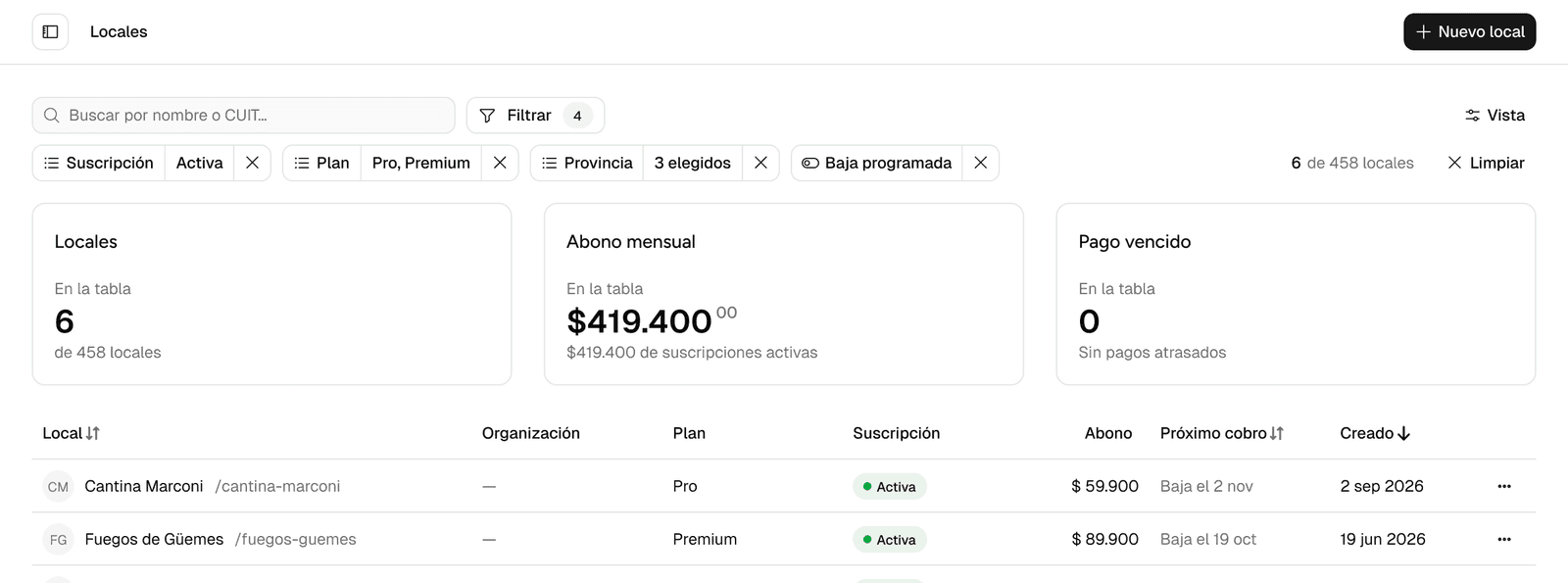
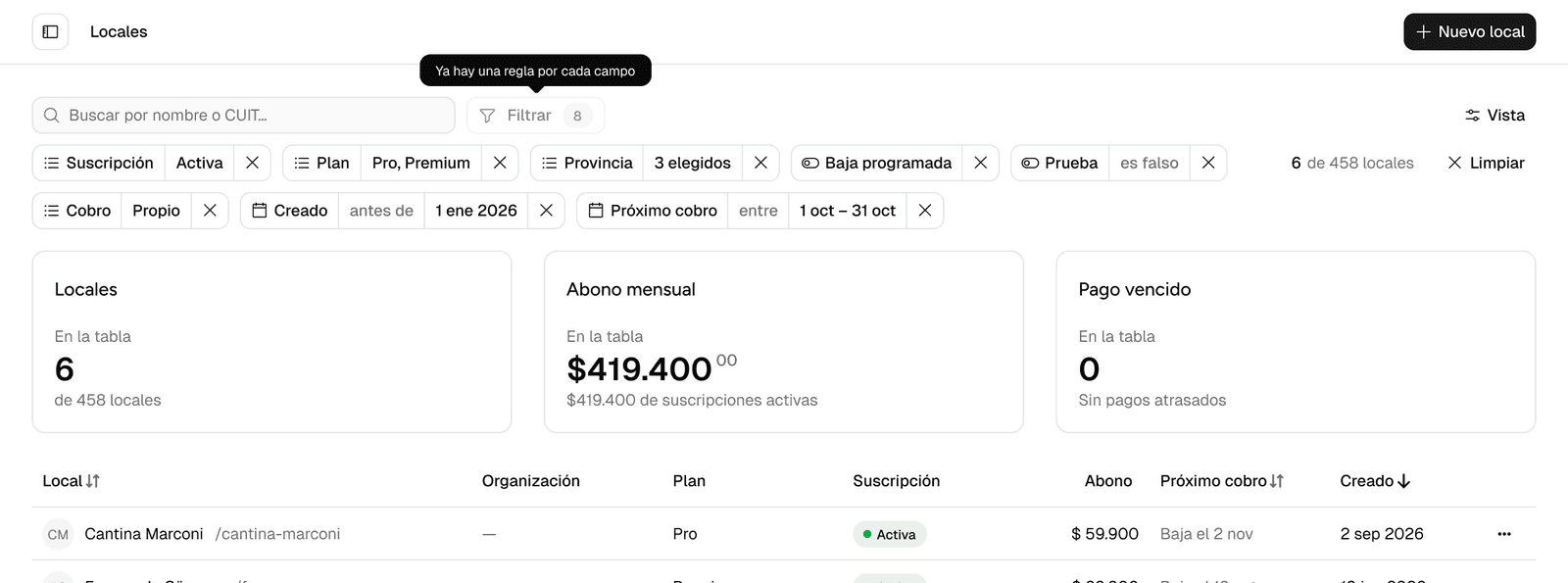
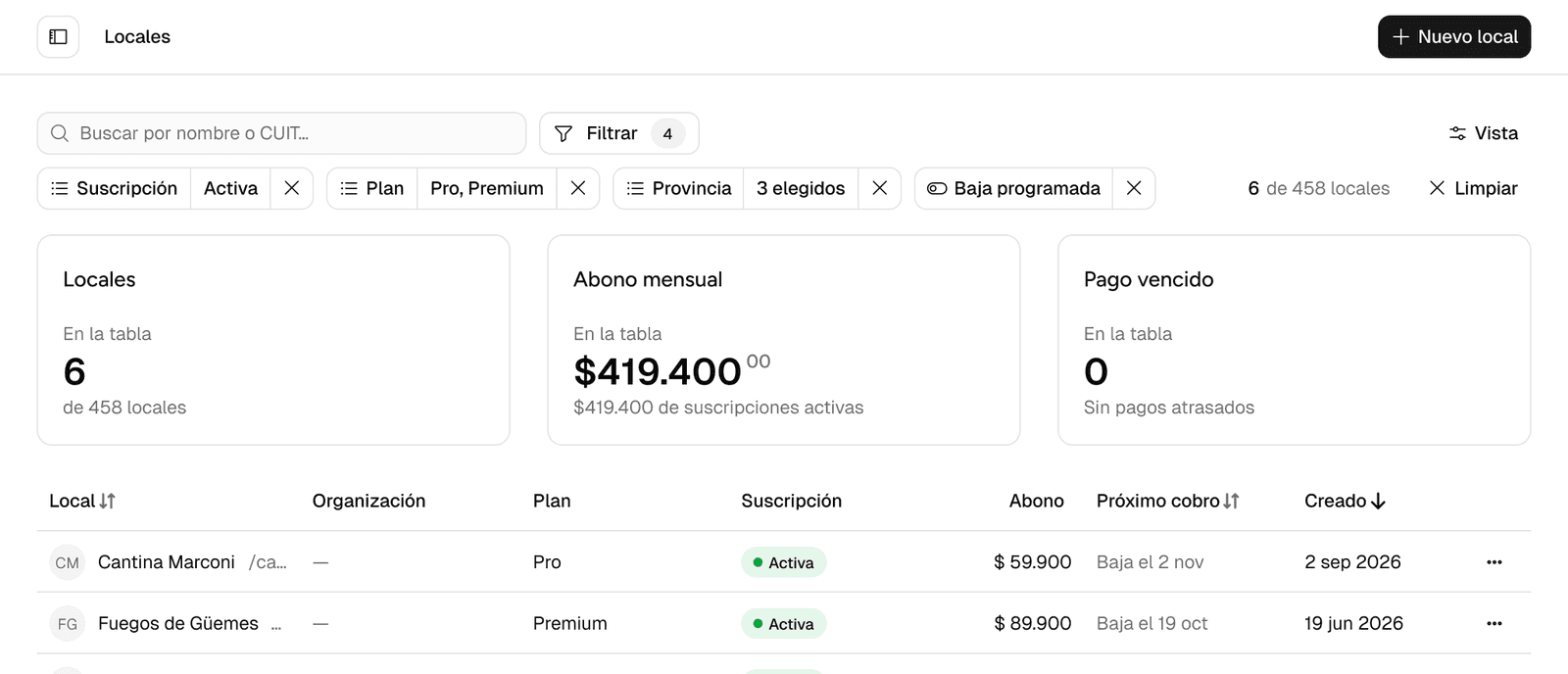
One change reaches past the toolbar: the chip stops showing the default operator. On lists, “is any of” is hidden, so “Subscription · is any of · Active” becomes “Subscription · Active”. On booleans, “is true” is hidden. Both stay in the aria-label. That change is what fits four rules on one row at 1440 and at 1280.
| Width | Rules | Patch | Round 1 winner | Synthesis |
|---|---|---|---|---|
| 1440 | 4 | 64 px | 100 px | 64 px |
| 1440 | 8 | not drawn | 136 px | 100 px |
| 1280 | 4 | not drawn | not drawn | 64 px |
| 390 | 4 | 244 px | 172 px | 116 px |
| 390 | 8 | not drawn | not drawn, over 300 px per the judge | 116 px |
On desktop with four rules, the synthesis measures the same as the patch, with fixed controls and every rule starting at the search’s edge. The height gain is on the phone, from 244 to 116 px.
Where the process could fool me
Eight agents produce a lot of material that looks like evidence, so I distrusted the agreements. When all four round 2 candidates hid the same operator, they were following the brief. I accepted the phone convergence as robust, knowing robust doesn’t prove best.
Two things kept it honest: real content and a judge that scored screenshots. The real Venues data surfaced a 278 px chip that lorem ipsum would have hidden, and a candidate’s notes got its own toolbar height wrong.
What it was worth
The first option I saw was the patch, and it would have become the toolbar of every table. The skill put eight directions side by side on real data before I committed to one, and that’s where I understood the problem: why controls that move are worse than a taller toolbar, and why the phone needed its own answer.
It took less than an afternoon. The agents drew in parallel and the judge scored while I reviewed, so my part was reading the results and deciding. For a component that every table repeats, that’s a small price for not settling on the first idea.
Next
If the interface is how your product works, write me.